New

Discover professional insights and connect with industry leaders. Featured Profiles

Bulk Enrichment

Overview

The Bulk Enrichment feature allows you to enrich multiple contacts or company records in a single upload, eliminating the need to process records one by one.

Whether you are working with a small prospect list or thousands of records, Bulk Enrichment helps you quickly retrieve verified contact information such as email addresses and phone numbers while keeping the process efficient, accurate, and scalable.

Once your file is uploaded, Deep Enrich automatically processes the records and adds enriched contacts to your selected list for easy management and future outreach.

Uploading Your CSV File
Upload Button

Getting started with Bulk Enrichment is simple.

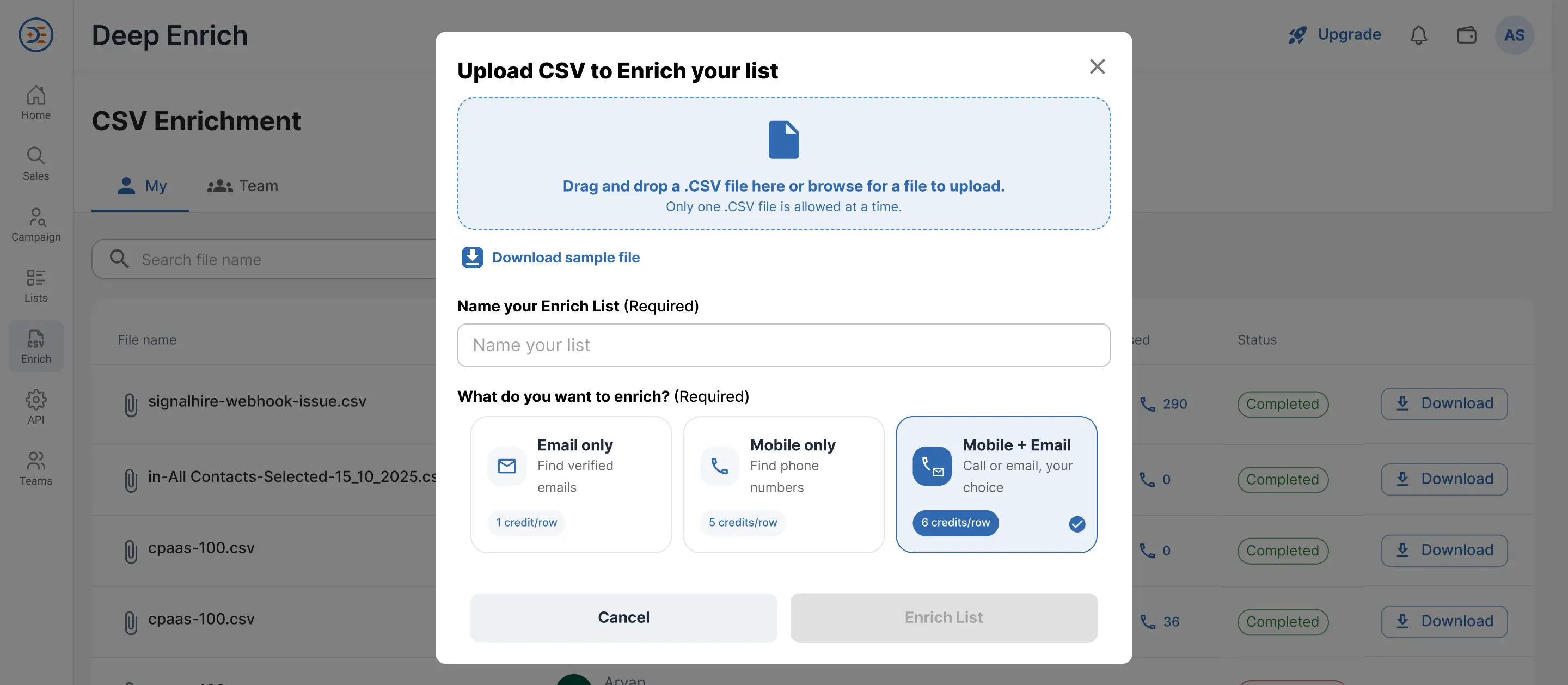
1: Upload Your File

You can upload your data by:

  • Drag and drop your CSV file into the upload area.
  • Click the upload box to browse and select a file from your computer.

Need Help with Formatting?

Before uploading, you can download the sample CSV file to ensure your data follows the correct format and includes all required fields.

Using the recommended format helps prevent processing errors and ensures the highest enrichment success rate.

Configure Your Enrichment Settings

After uploading your file:

Give your list a name. Example: HR Leads - Jaipur. All successfully enriched contacts will automatically be added to the selected list.

2: Select Enrichment Type

Choose the information you want Deep Enrich to retrieve:

  • Email Addresses Only
  • Phone Numbers Only
  • Both Email Addresses and Phone Numbers

Select the option that best matches your outreach requirements.

Select Enrichment Type

Once your settings are configured:

  1. Review your file and enrichment preferences.
  2. Click Enrich List.
  3. Deep Enrich will begin processing your records automatically.

The platform will validate your records, remove invalid entries where applicable, and begin searching for verified contact information.

Tracking Your Enrichment Progress

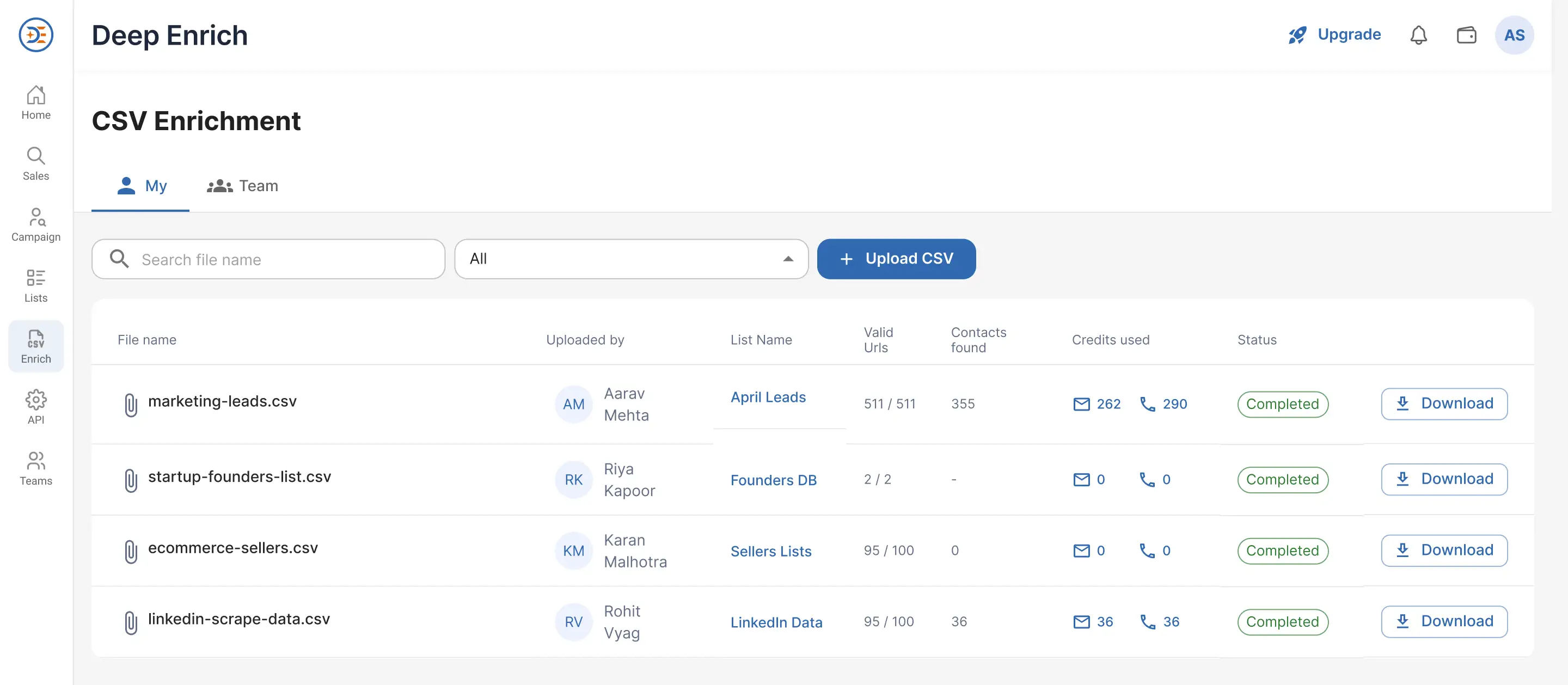
After uploading your file, all enrichment jobs are displayed in the CSV Enrichment Dashboard.

CSV Enrichment Dashboard

The dashboard provides complete visibility into the status and performance of each upload.

  • File Name & Uploaded By: Displays the uploaded CSV file name and the user who uploaded the file. This is especially useful for teams managing multiple enrichment projects simultaneously.
  • List Name: Shows the list where enriched contacts will be stored once processing is complete.
  • Valid URLs Processed: Displays the total number of valid records successfully processed from your uploaded file. During processing, Deep Enrich automatically excludes invalid records, empty rows, and duplicate entries. This helps maintain data quality and ensures credits are used efficiently.
  • Contacts Enriched: Shows the number of records successfully enriched with verified contact information. This may include verified email addresses, verified phone numbers, or both email and phone data.
  • Credit Usage: Displays the total credits consumed during enrichment. Credits are deducted only when verified contact information is successfully returned.
    1. Credits are charged only for successful enrichments.
    2. No credits are deducted when no verified data is found.
    3. If the dashboard displays 0 Credits Used, the enrichment was completed using existing account data and no additional enrichment credits were required.
Understanding Enrichment Statuses

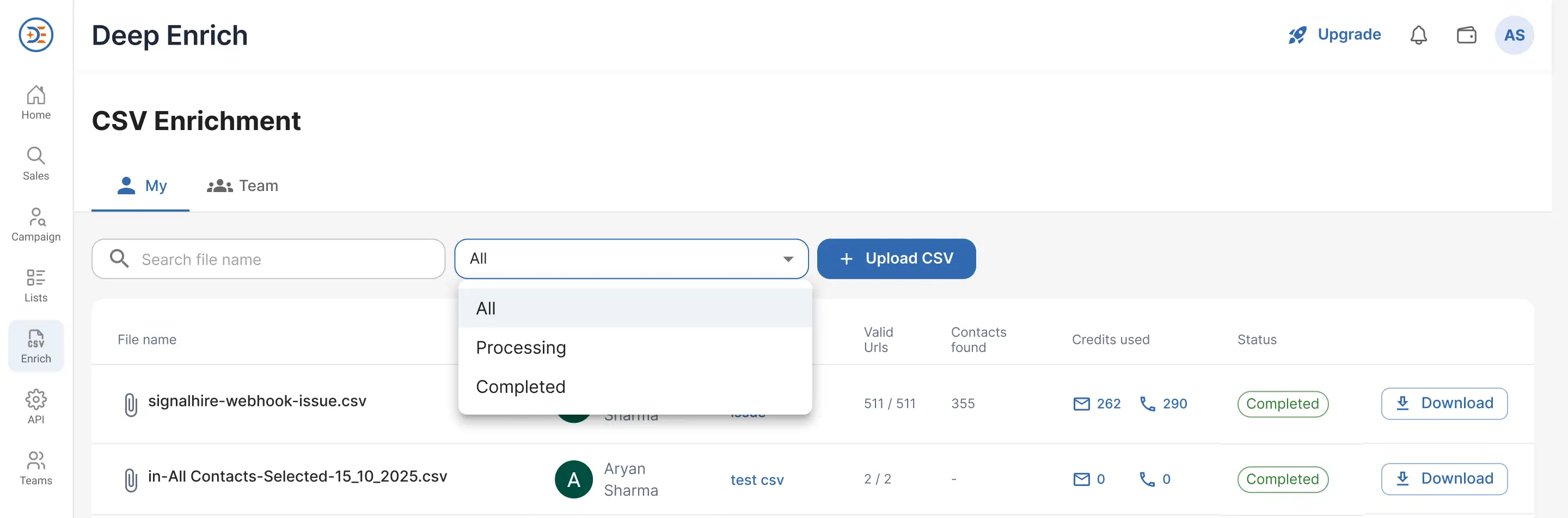
Each uploaded file displays its current processing status.

Enrichment Statuses
  • Processing: The file is currently being enriched. During this stage, Deep Enrich is validating records and searching for verified contact information across multiple data providers.
  • Completed: The enrichment process has finished successfully. Your enriched data is now available for review and download.
Downloading Enriched Results

Once the status changes to Completed, a Download option becomes available. Click Download to retrieve your enrichment results.

What's Included in the Download?

The downloaded file contains only successfully enriched contacts and verified records. Records that could not be enriched are not included in the downloaded file. This ensures you're working exclusively with validated and usable contact data.

Team Collaboration

The Team tab lets you view and manage files uploaded by your teammates to ensure smooth collaboration and better visibility of enrichment activity across your organization.

Explore our other collections

Deep Enrich Extension
DeepEnrich Campaign Simplify and automate your leads discovery and buying process.
View all
Team Management
Team Management Seamlessly manage your team and collaborate efficiently.
View all
Email & Phone Finder
My Account Easily access and manage your account details.
View all
Deep Enrich Extension
DeepEnrich Extension Take a deep tour of our Google Chrome extension.
View all
Email & Phone Finder
Dashboard Stay updated with your account performance and recent activity.
Read more
Sales Panel
Sales Panel Quickly access and manage your prospects.
Read more
Bulk Enrichment
Bulk Enrichment Enrich multiple profiles or company records at once
Read more